







The Customize studio
Seven sections, a live preview of your real page, and saving that you control.
1 min read3 parts
On this page
01Layout
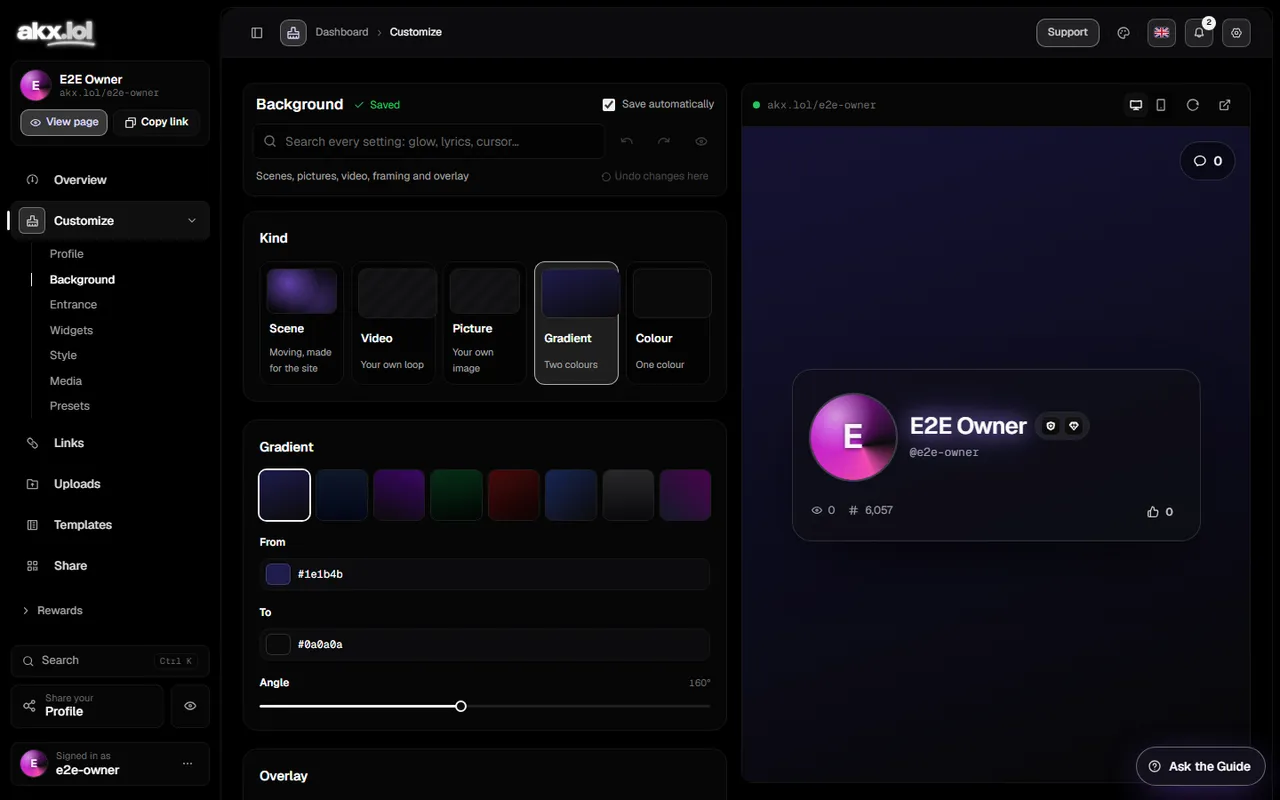
Pick a section on the left, change it in the middle, and watch your page on the right. The preview is drawn by the same code as your public page, so it is exactly what visitors see. Switch it between computer and phone at the top.
| Section | What is in it |
|---|---|
| Profile | Display name, bio, avatar and decoration, projects, games, card layout, links and the order of blocks in your card. |
| Background | Scene, picture, video, gradient or colour; framing (what stays in view, zoom) and the overlay. |
| Entrance | The opening scene from the shop, previewed on hover, and how your card arrives. |
| Widgets | Every block under your card, switched on and dragged into order, plus Discord status, GitHub and League. |
| Style | Colours, username effects, the About me look (presets, glass, blur, corners, border, glow, heading, layout), font, tooltips, effects, cursor, living page and stickers. |
| Media | Every upload with progress and preview: avatar, banner, cursor, sounds, font, tab icon, share image. Music player and enter screen. |
| Presets | Quick styles: a complete look in one click. |
TipThe search box looks through every section at once.
02Saving, undo and compare
- With Save automatically on, changes save 2.5 seconds after your last edit. Turn it off to save only when you press Save.
- Discard puts back the last saved version. Undo changes here does it for the open section only.
- Uploads save as soon as they finish, and keep your other unsaved changes.
- Hold the eye button to see your saved page instead of your edits; let go to return.
- Leaving with unsaved changes asks you first.
03Shortcuts
| Keys | Does |
|---|---|
| Ctrl+S | Save now. |
| Ctrl+Z / Ctrl+Shift+Z | Undo / redo (outside text boxes). |
| / | Jump to the settings search. Try words like glow, lyrics or cursor. |
Did this answer your question?
More in Your page
- BackgroundsColour, gradient, picture, video or a live 3D scene, and how to keep text readable.
- Avatar and decorationsYour picture, its size and shape, and the animated decorations around it.
- Card, banner and link styleThe box your profile sits in, the banner above it, and how link icons look.
- Music, lyrics and the enter screenUpload tracks, add synced lyrics, and why sound waits for a click.